Secure Data Erasure: A Briefing for Non-Technical Trustees
RE(YOU)S is the Coventry reuse organisation I volunteer for. They want to start taking laptops in from the public and handing back refurbished ones, which means becoming responsible for other people's personal data. Pass a machine on with data still recoverable and it is a reportable breach. It makes no difference that the organisation is a non-profit, or that the laptop was given away.
Nobody there had the technical background to work out what was needed, so it was not clear whether this was achievable, what it would cost, or what to buy. I researched it and wrote it up so they could decide properly rather than guess. This page is what I took from doing it; the briefing itself is below.
- Data Protection
- UK GDPR
- NIST SP 800-88r2
- IEEE 2883
- Research
- Technical Writing
Why they needed it
The requirement they are assessed against is a single line: evidence that data wiping is carried out securely in accordance with IEEE 2883 or NIST SP 800-88. One line, two standards, and no indication of what either of them asks for. That gap is what the note fills.
The underlying problem is the one nearly everybody gets wrong. Deleting a file does not remove it. Neither does emptying the recycle bin, formatting the drive, or reinstalling Windows. All of those mark the space as free for reuse while leaving the data exactly where it is, and free software will recover it. Reinstalling Windows over the top is one of the specific failure modes the standards exist to prevent.
A laptop passed on with recoverable personal data on it is a personal data breach, reportable to the ICO, whether the machine was sold, exchanged, donated or recycled.
Read it
What it taught me
- Reading a standard and working out what it actually obliges you to do. A requirement naming two standards in one line does not tell you which one governs what. NIST SP 800-88r2 sets the programme: who is responsible, which methods are approved, what records are kept, how you prove it happened. IEEE 2883 sets the technique for each type of drive. They are not alternatives, and Revision 2 deliberately dropped the technical instructions and points at IEEE 2883 for them instead.
- Checking that a source is current. Revision 2 was published in September 2025 and NIST withdrew Revision 1 the same day. Any policy or supplier questionnaire still citing Rev. 1 is pointing at a withdrawn document. Missing that would have dated the whole note on the day I wrote it.
- Writing for people who have to decide rather than follow. Trustees do not need the procedure. They need to know whether it is achievable, what it costs, and what happens if it goes wrong. That meant leading with the answer, keeping the reasoning underneath it for anyone who wanted it, and explaining what a TPM is without using the word cryptography.
- Separating what the standards require from what we would be adding by choice. It would have been easier to present everything I found as compliance. It would not have been honest, and it falls over the first time an assessor asks why we do something.
- Recommending something that costs money and making the argument for it. The cheaper tools are not broken. The case for paying is about which mistakes stay possible, not about what the software can do.
Clear, Purge, Destroy
Both standards use the same three levels, and picking the right one is itself a requirement. For any machine leaving the organisation's hands and going to somebody else, the level needed is the middle one.
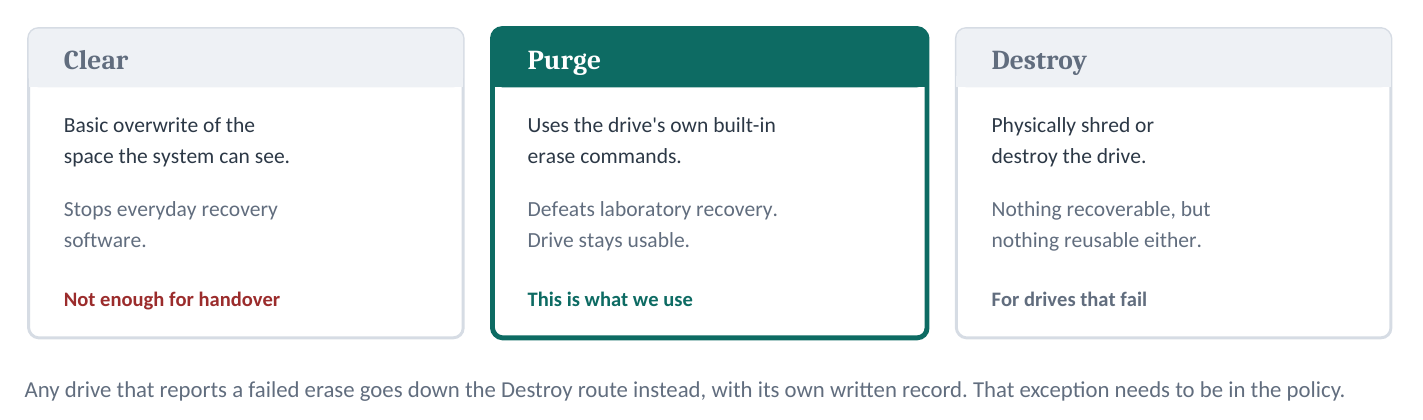
Clear is a basic overwrite of the space the system can see, which stops everyday recovery software and nothing more. Purge uses the drive's own built-in erase commands, defeats laboratory recovery and leaves the drive usable. Destroy is physical, and is where any drive that reports a failed erase has to go, with its own written record. That exception needs to be in the policy rather than left to whoever is at the bench.
The trap in the middle
The most useful thing in the note is the part that catches people out, and it is a hardware problem rather than a paperwork one.
Overwriting a spinning hard disk reaches everything, because writing over the whole surface is exactly what it sounds like. Solid-state drives do not work that way. They shuffle data between cells constantly and hold a pool of reserve capacity the operating system cannot address, so an overwrite never touches it.
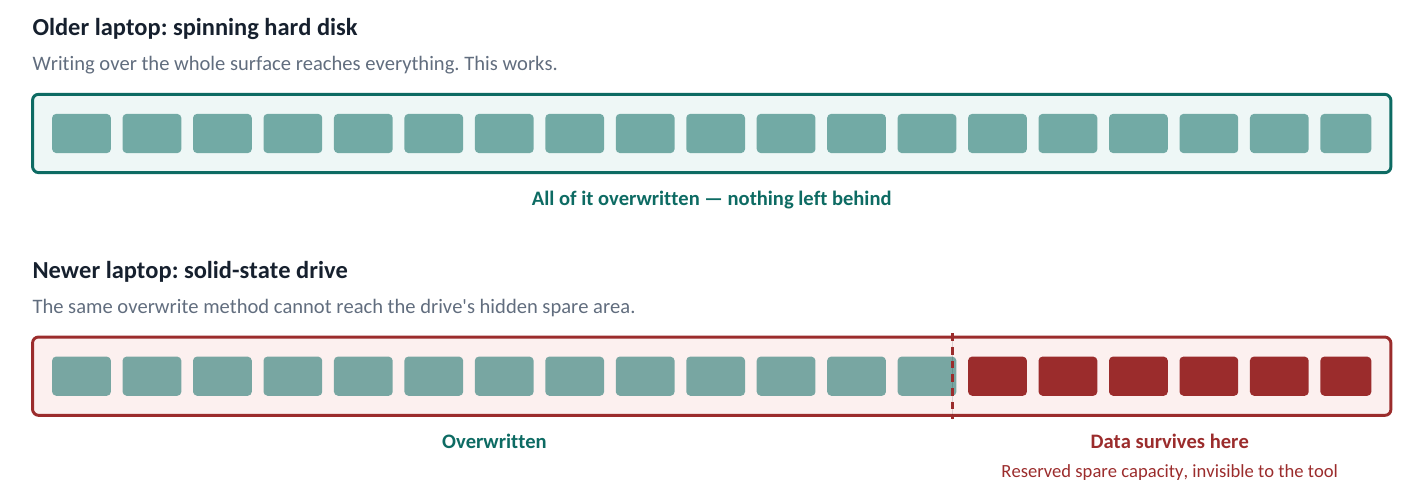
The fix is to send the drive its own built-in erase command and let the controller run it internally across the whole chip. That is the difference between Clear and Purge, and it is the single most common audit failure in this sector.
Run the wrong method on a modern laptop and the screen still says complete, the drive still looks empty, and some of the previous owner's data is still recoverable. Nothing warns you. That is the whole reason to care about which tool gets bought.
What the standards require, and what we would be adding
Not everything in the note is compliance, and I thought it mattered to say which was which. An assessor is checking against NIST SP 800-88r2 and IEEE 2883, and a fair amount of sensible practice sits outside both. It is still worth doing, but for different reasons. If the organisation runs short of time, the first group is the part that cannot slip.
Squarely required by the standards:
- The three levels, and choosing the right one for the job
- Matching the method to the type of drive, and not overwriting solid-state media
- Verifying the result on every machine rather than just issuing the command
- A record of sanitisation per device, carrying the fields the guidance sets out
- A written policy with named roles, approved methods and decision criteria
- Destroying any drive that fails, and recording that separately
- Covering every piece of storage in the machine: second drives, SD cards, SIMs, soldered flash
In scope but with no method given. The guidance is clear that the whole device has to be considered rather than just the obvious drive, but it stops short of saying how to handle the TPM beyond key sanitisation, the fingerprint reader's secure element, or other firmware-resident storage on the mainboard, because no general method exists.
The fingerprint reader is the one people query, so it is worth spelling out. The templates sit in permanent storage on the sensor and survive a drive wipe, and biometric data is special category under UK GDPR, so the case for covering it is strong. But IEEE 2883 is built around storage interfaces, SATA and NVMe and eMMC, and a fingerprint sensor is not a storage device on any of them. No erase command exists for it, and there is no way to read back and confirm the result. A framework built on evidence has nowhere to file that. The answer I gave was to follow the manufacturer's own instructions and record what was done.
Outside both standards entirely. None of this is data sanitisation, and I said so rather than dressing it up: removing a supervisor password, clearing the management engine and Secure Boot keys, checking for cloud enrolment, the donor declaration, the asset register, and taking the old organisation's stickers off. All worth doing, none of it required.
The parts a wipe does not reach
Erasing the drive is most of the job and not all of it. A laptop holds data in a few other places, and it can stay tied to its previous owner in ways no wiping tool can undo. Splitting the work into three is worth doing in the written policy, because it shows an assessor where the organisation's control ends.
- The drive
- Main drive, any second drive, an SD card left in the slot, the SIM. Handled by the erasure tool, evidenced by its certificate. Required by both standards.
- The chips
- TPM, fingerprint reader, management engine, supervisor password, firmware asset tag. Done by hand in the BIOS menu, evidenced by a signed QC checklist. Partly in scope.
- The cloud
- Windows Autopilot, Apple Activation Lock, Chromebook enrolment, Absolute tracking. Only the donor can release these, evidenced by a signed declaration taken before the machine is accepted. Outside both standards.
Two explanations turned out to do the work. The TPM is a small chip that acts as a built-in safe for passwords and encryption keys: erasing the drive empties the filing cabinet but leaves the safe standing in the corner, still locked and still full. Cloud enrolment is the other one. Some business laptops are registered to their old company's IT system, and wiping the drive changes nothing, because the moment the machine reaches the internet it re-registers itself to them. It is a phone still locked to a stranger's iCloud account, and only they can release it.
Resetting the BIOS does not deal with any of this. Load setup defaults deliberately leaves the security items alone, because anything designed to stop a thief has to survive a reset too. Nor does taking the small round battery out. Modern laptops keep all of it in permanent storage.
The donor declaration works when a business hands over a batch and their IT team can release the machines first. It does not work when an individual walks in with their own laptop, because there is no IT team to ask and people frequently cannot remember the password. Those checks have to happen at the counter while the person is still standing there, and the intake form should say so plainly.
What I recommended
All three tools I looked at can produce a compliant Purge and a certificate. What separates them is how much technical judgement they ask of whoever is at the bench.
- ShredOS · free
- Excellent on older spinning disks and produces a detailed certificate, but its own documentation states plainly that it cannot fully sanitise solid-state drives, so those need separate typed commands. Two processes to maintain, and real scope for error.
- Parted Magic · tens of pounds
- A graphical desktop covering hard disks, SSDs, NVMe and eMMC, with a signed certificate per erase and no limit on drives. The operator still picks the method from a menu, so they have to understand the difference.
- Blancco · per device
- Detects the drive type and selects the method itself, so the operator cannot pick the wrong one. Independently validated, and certificates are filed centrally without anyone having to remember to save them.
I recommended Blancco or an equivalent validated product if the budget allows. The argument is not that the cheaper tools are broken. It is that they let a well-meaning volunteer do the wrong thing while everything on screen looks correct. Paying removes that failure mode, produces the certificates automatically, and gives the organisation a third party's validation to point at when it is assessed. At a few pounds per machine against the cost of a single breach, that is a reasonable insurance premium.
The fallback, if the money is not there yet, is to start on Parted Magic while volumes are low and one trained person handles every machine, then move to a validated tool as soon as the work is shared out. There is a compliance argument for paying as well: neither standard names a product, so no tool is ever mandated, but Revision 2 added an explicit expectation that you establish trust in the vendor's implementation of whatever technique you use. Independent validation is the most direct way to satisfy that, and it is a fair point to make when the cost is questioned.
Where it stands
The briefing is with RE(YOU)S and there is no decision yet. That one is not mine to make, and the point of writing it was that it could be made on the facts rather than guessed at. What I would want to do next is the setup: build the bench routine, write the work instruction that goes with it, and run the first machines through end to end.
I should be straight about the limits of this. I have researched and specified it, not operated it. I have not yet purged a drive to this standard, produced a certificate or been assessed against either document. It is the same gap as everywhere else on this site, and the same reason I want an apprenticeship.